PRODUCT TOUR

From WordPress change to controlled release.

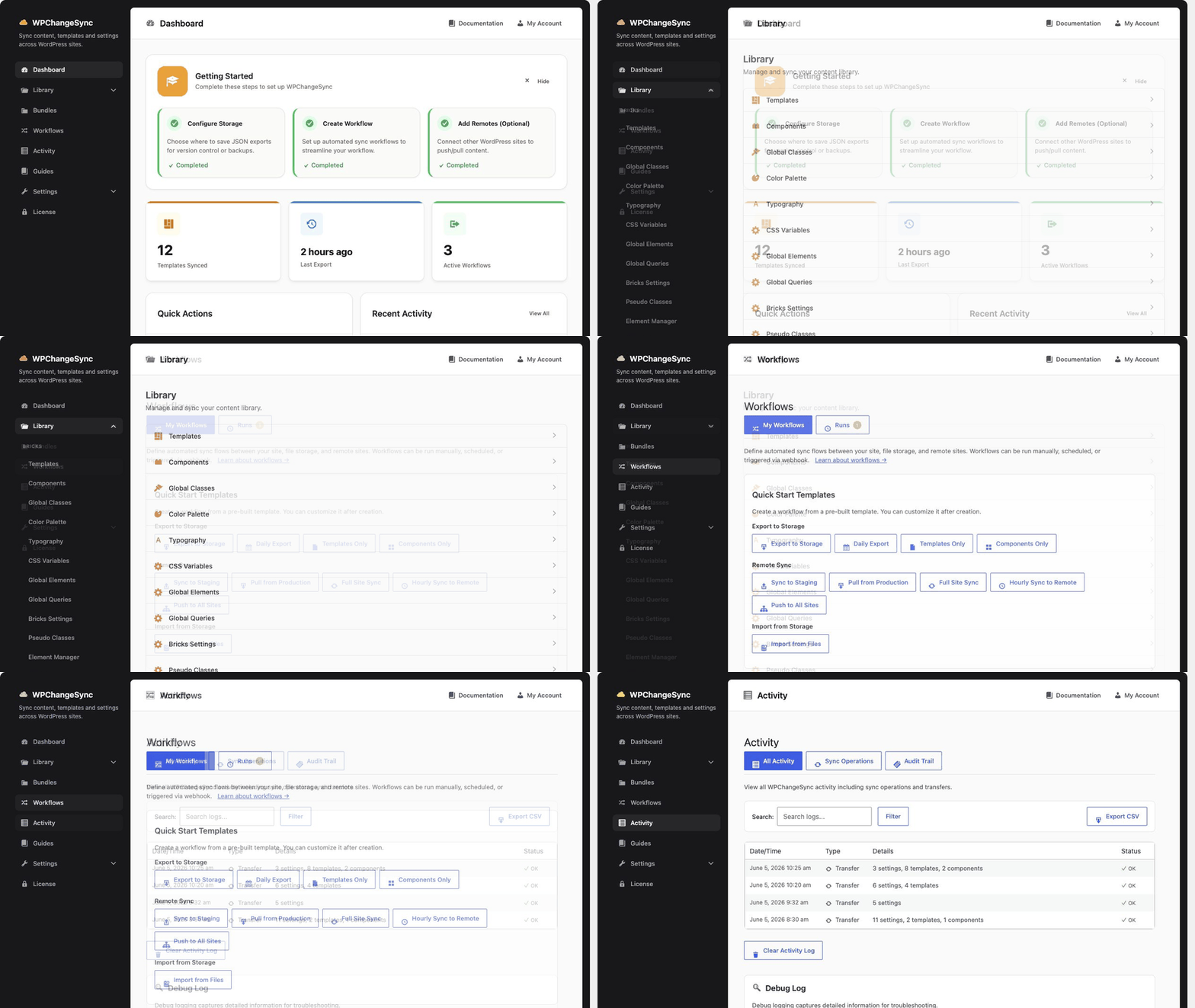
Follow the WPChangeSync workflow from setup to selected sync, dry-run, conflict handling, remote push, audit trail, and rollback. This is the fastest way to understand what the plugin actually does.
WPChangeSync product overview walkthrough
Watch

See WPChangeSync in action

Loading the trailer…

01

The core workflow

WPChangeSync is built around a repeatable release path. You can start manually, then add remotes, approvals, notifications, WP-CLI, and CI/webhook automation when the workflow matures.

Choose storage and licence

Activate WPChangeSync, confirm licence status, and choose child-theme, uploads, or custom-path JSON storage.

Pick the data that should move

Use the Library to choose templates, components, pages, media, menus, fields, settings, or supported integration data.

Run a dry-run or dependency check

Preview the scope before writing to production. For content and templates, check related media, fields, terms, parents, and dependencies.

Choose conflicts and backups

Use skip, overwrite, duplicate, newer-wins, backup-then-overwrite, merge, or prompt strategies before imports.

Export, import, push, pull, or run a workflow

Move changes through storage, authenticated remotes, selected pushes, workflow steps, WP-CLI, or CI webhooks.

Audit, restore, and repeat

Use Activity, audit logs, workflow runs, backup records, and template versions to verify and recover when needed.

02

Main product surfaces

The admin UI is organized around the jobs teams actually need to do.
Core capability

One plugin, several operating modes.

WPChangeSync can be used as a manual JSON export tool, a Git workflow helper, a remote sync layer, a production release checklist, a CI trigger, or a multisite rollout system. The same core engine powers each mode.

Library

Select and move items

Export/import individual items, selected items, or entire integration payloads from supported Library sections.

Workflows

Automate release steps

Create dry-runs, approvals, backups, maintenance windows, remotes, notifications, and repeatable production paths.

Activity

Review what happened

Inspect sync history, workflow runs, import/export outcomes, failures, approvals, and audit records.

Config

Control storage and remotes

Manage JSON storage, sync modes, remotes, groups, workflow settings, and cleanup tools.

Guides

Use built-in playbooks

Use setup, workflow, batch, global styles, troubleshooting, and feature-specific guides for safer adoption.

CLI/API

Automate outside wp-admin

Use WP-CLI, REST endpoints, webhooks, and batch APIs when releases need scripts or CI.

03

Choose your first tour path

Different teams should start in different places.
Bricks team

Sync templates and design system

Start with Bricks templates, components, global styles, variables, classes, custom fonts, and capabilities.

Bricks guide →
Non-Bricks site

Move WordPress content and config

Start with pages, posts, media, menus, widgets, Gutenberg, fields, and supported plugin integrations.

Non-Bricks guide →
Agency

Repeat staging-to-production releases

Start with remotes, selected pushes, dry-runs, conflict policies, and production approval checklists.

Release checklist →
Multisite

Roll out one change to many sites

Start with remote groups, batch jobs, throttling, audit logs, and high-blast-radius safeguards.

Multisite guide →
CI team

Trigger workflow automation

Start with WP-CLI status checks, workflow dry-runs, and secured webhooks from deployment pipelines.

CI guide →
Existing BricksSync user

Keep working, add new features

Start with the customer update: same licence, same workflows, new name, more capability.

Customer update →
04

What makes the workflow safer

The value is not only moving data. It is moving data with enough review to trust the result.
Core capability

Every production path should have a safety story.

WPChangeSync gives teams concrete control points: selected scope, Git-friendly files, dependency previews, dry-runs, conflict strategies, backups, approval gates, maintenance windows, rate-limited remotes, audit trail, and restore paths.

Before sync

Review scope and dependencies

See what will move before production changes, especially for templates with media, fields, classes, and related content.

During sync

Use workflow gates

Pause high-risk steps, notify stakeholders, use maintenance mode, and keep broad operations observable.

After sync

Audit and restore

Check activity records, workflow runs, audit exports, backups, and template version history after execution.

05 — FAQ

Product tour questions

Do I need to use every WPChangeSync feature?
No. Many teams start with manual JSON export/import, then add remotes, workflows, approvals, WP-CLI, or batch jobs when the process needs more control.
Does WPChangeSync replace Git?
No. It complements Git by turning WordPress-managed data into reviewable JSON files that can live alongside your project workflow.
Does it only work with Bricks?
No. Bricks remains first-class, but WPChangeSync 2.0 is builder-agnostic and supports broader WordPress workflows where integrations are available.
Can I test without touching production?
Yes. Use local/staging sites, export-only workflows, dry-runs, selected scope, and demo data before creating production write paths.
NEXT STEP

Ready to see whether WPChangeSync fits your workflow?

Start with compatibility, then choose the plan or contact support with your stack, number of sites, and current deployment process.