Product features

One sync engine for WordPress changes.

WPChangeSync syncs builder data, WordPress content, media, menus, field definitions, settings, workflows, bundles, and integrations through a controlled JSON workflow.
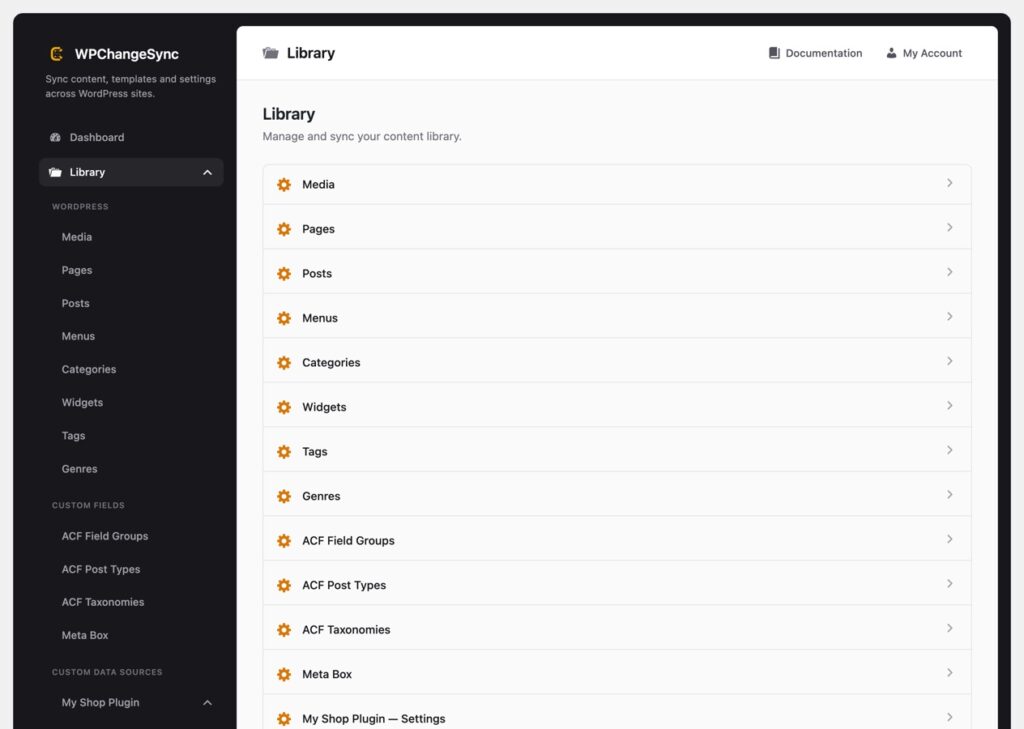
WPChangeSync library and integrations
WPChangeSync Library screenshot
01 — Library

Everything starts in the Library

The Library groups syncable integrations by what they are, so teams can export, import, push, pull, and run workflows from one place.
Core capability

Select exactly what should move

Templates, components, pages, posts, media, menus, widgets, categories, tags, ACF field groups, ACF post types, ACF taxonomies, ACPT, MetaBox, Gutenberg patterns, Bricks settings, and CSS frameworks can be handled as structured integrations.

Selected items

Push only what changed

Select specific items instead of pushing an entire site section.

Bundles

Package related changes

Group templates, components, settings, and content into reusable job definitions.

Manifests

Track files cleanly

Generated manifests keep item labels, slugs, hashes, and versions inspectable.

06

Why not just use database dumps?

Database migrations are useful, but they are often too broad for everyday WordPress change work.
Core capability

Move controlled changes instead of replacing everything.

WPChangeSync is designed for the space between full-site cloning and manual copy-paste: selected templates, components, fields, pages, media, menus, settings, remotes, and workflows that can be reviewed and repeated.

Selective

Push only what changed

Keep production content, users, orders, and environment-specific data out of the release when they are not part of the change.

Reviewable

JSON files and dry runs

Inspect export files, run dry-runs, and choose conflict behavior before production writes.

Repeatable

Workflows and WP-CLI

Use named workflows, webhooks, and scripts instead of remembering manual steps.

02 — Conflicts

Conflict handling built for real sites

Production already has content. Staging already has edits. WPChangeSync assumes differences are normal and gives you options.
Core capability

Seven resolution strategies

Skip, overwrite, duplicate, use newer, backup then overwrite, merge, or prompt per item. Review diffs and make high-risk decisions explicitly.

Prompt queue

Hold decisions for review

Conflicts can be queued and resolved by a human instead of during an automated run.

Merge

Preserve useful changes

Field-level and Bricks element-tree merges help avoid throwing away target-side work.

Backups

Restore after a bad call

Snapshots are stored before overwrites so teams can recover quickly.

03 — Audit

Every operation leaves a trace

For client work, regulated environments, and busy teams, the answer to “who changed this?” should be easy.
Core capability

Audit log and activity history

WPChangeSync records actor, action, target, context, status, message, summaries, and detailed data with filterable queries and exportable CSV/JSON logs.

Actors

User and source context

Record user, login, IP, remote ID, workflow ID, and operation ID.

Exports

Compliance-friendly logs

Export selected audit windows for review, handoff, or client reporting.

Retention

Control log lifetime

Retention policies keep logs useful without growing forever.

05 — Universal

Sync any WordPress content — with or without Bricks

WPChangeSync is not tied to a page builder. It moves the content and configuration that matter, and unlocks the full Bricks set when Bricks is active.
Core capability

One engine, every site

Posts, pages, menus, widgets, media, categories, tags, and auto-discovered custom post types and taxonomies — plus custom fields from ACF, Meta Box, and ACPT. When Bricks is installed, templates, components, settings, and global styles come along too.

06 — Extend

Extend it to anything — no code required

Build a sync source from any plugin's data in Settings → Data Sources, or ship native support as a developer.
Core capability

Custom data sources & the integration studio

Combine options, custom tables, post types, and taxonomies into one Library group without writing code. Developers can export any source as a shippable integration — a JSON config or a wpchangesync_register_integration() snippet.

04 — Reliability

Operational details matter

WPChangeSync includes the unglamorous pieces that keep sync workflows from breaking at scale.
Large media

Avoid timeout-prone transfers

Deferred background downloads and per-item media pushes reduce gateway timeout risk.

Locks

Prevent concurrent corruption

Batch and workflow locks protect counters and state during cron/AJAX processing.

Cleanup

Keep storage accurate

Stale JSON cleanup, manifest management, and runtime cleanup tools reduce drift.

05

Security and production trust

A sync tool becomes valuable when teams trust it near production.
Core capability

Built around review, recovery, and accountability.

WPChangeSync combines authenticated remotes, REST hardening, safe import handling, dry-runs, conflict strategies, backup snapshots, restore paths, and audit records so teams can move faster without hiding risk.

API safety

Authenticated and rate-limited remotes

Use HTTPS, application passwords, capability checks, sanitized remote errors, and shared rate limiting.

Recovery

Backups and template versions

Create snapshots before overwrites and restore known-good versions when imports go wrong.

Accountability

Activity and audit trail

Track workflow runs, approvals, imports, exports, validation failures, and restore activity.

Features

Build a safer WordPress release process

Use files, remotes, workflows, conflicts, backups, and audit logs together.